Unreal to Unity Mask Map Converter
A downloadable tool for Windows
U2Unity
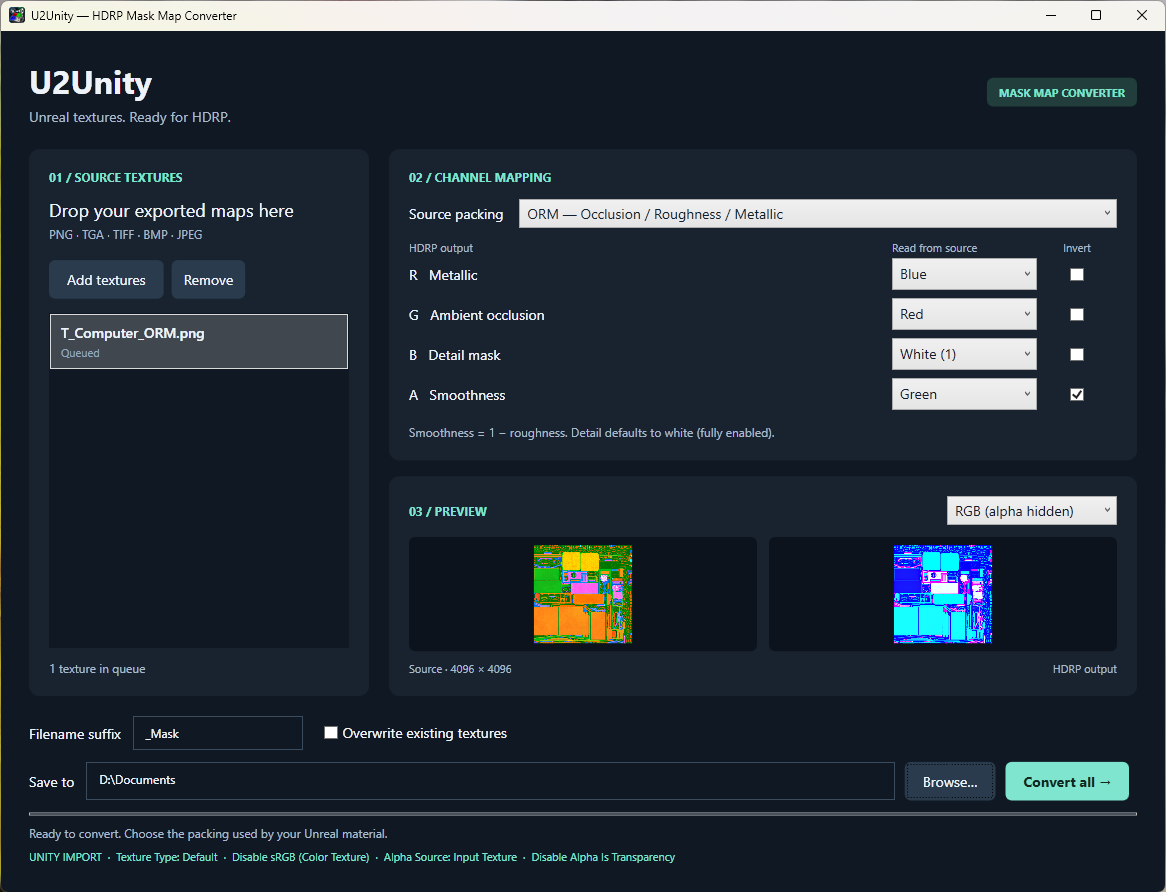
A native Windows desktop application that converts exported Unreal packed mask textures into Unity HDRP Lit mask maps. No Unity or Unreal installation is required.
Use
- Run
U2Unity.exe - Drop exported textures into the window, or choose Add textures.
- Select the packing used by your Unreal material. The default is ORM. Unreal materials can use arbitrary channel assignments; confirm them in the original material rather than relying on the texture filename.
- Adjust channels and inversion if needed. Each output channel can read source R/G/B/A or a constant black, gray, or white value.
- Set Filename suffix (default
_Mask). The suffix is appended exactly as entered for normal exports. Overwrite mode ignores the suffix and disables this field; unchecking overwrite restores your suffix. - Choose whether to enable Overwrite existing textures, select the output folder, then Convert all.
The app writes lossless 8-bit RGBA PNGs at the source resolution, named <source>_Mask.png by default. For example, suffix _CustomMask produces <source>_CustomMask.png. Existing files are preserved by default; duplicate export names receive _2, _3, etc. Enable Overwrite existing textures to save as <source>.png, with no suffix or numbering, replacing matching PNG files in the chosen output folder. Each image is fully encoded to a temporary file before the destination is replaced.
Channel mapping
| HDRP output | Meaning | ORM source | RMA source | MRA source |
|---|---|---|---|---|
| R | Metallic | B | G | R |
| G | Ambient occlusion | R | B | B |
| B | Detail mask | White (1) | White (1) | White (1) |
| A | Smoothness | 1 − G | 1 − R | 1 − G |
White detail mask enables detail across the whole surface. Change it to black to suppress detail or choose a source channel for an authored mask. The HDRP preset preserves all four channels, and Custom permits any mapping. Inversion computes 255 − source on each 8-bit sample.
RGB previews deliberately hide transparency so a low smoothness value does not hide the texture. Use Alpha / Smoothness to inspect alpha as grayscale. In channel views, the source preview displays that source channel and the output preview displays the corresponding HDRP channel. Previews are reduced to at most 512 pixels; exports always use full resolution.
Unity import
For the exported texture:
- Set Texture Type to Default.
- Disable sRGB (Color Texture) so mask values are read as linear data.
- Set Alpha Source to Input Texture and disable Alpha Is Transparency. Alpha contains smoothness.
- Assign the texture to the HDRP Lit material's Mask Map slot.
- Set the importer's Max Size and compression according to your precision/resolution requirements. Unity import settings may otherwise downscale or compress the exported data.
Supported input
PNG, TGA, TIFF, BMP, and JPEG image files. TGA supports uncompressed and RLE 8-bit grayscale and 24/32-bit true color, including all four image origins. Color-mapped and interleaved TGA files are rejected. Multi-frame files use their first frame. Prefer lossless PNG/TGA/TIFF inputs: JPEG already contains compression loss.
Input samples are treated as numeric mask data; embedded color profiles are ignored and no gamma correction is applied. Inputs with greater than 8-bit precision are converted to 8-bit. Source alpha is available for custom mapping. This app converts exported image files, not .uasset, DDS, EXR, base color, normal maps, or complete Unreal materials. Terrain layer packing uses a different blue-channel meaning; the presets here target HDRP Lit materials.
Purchase
In order to download this tool you must purchase it at or above the minimum price of $4 USD. You will get access to the following files: